
Meeting Timeline
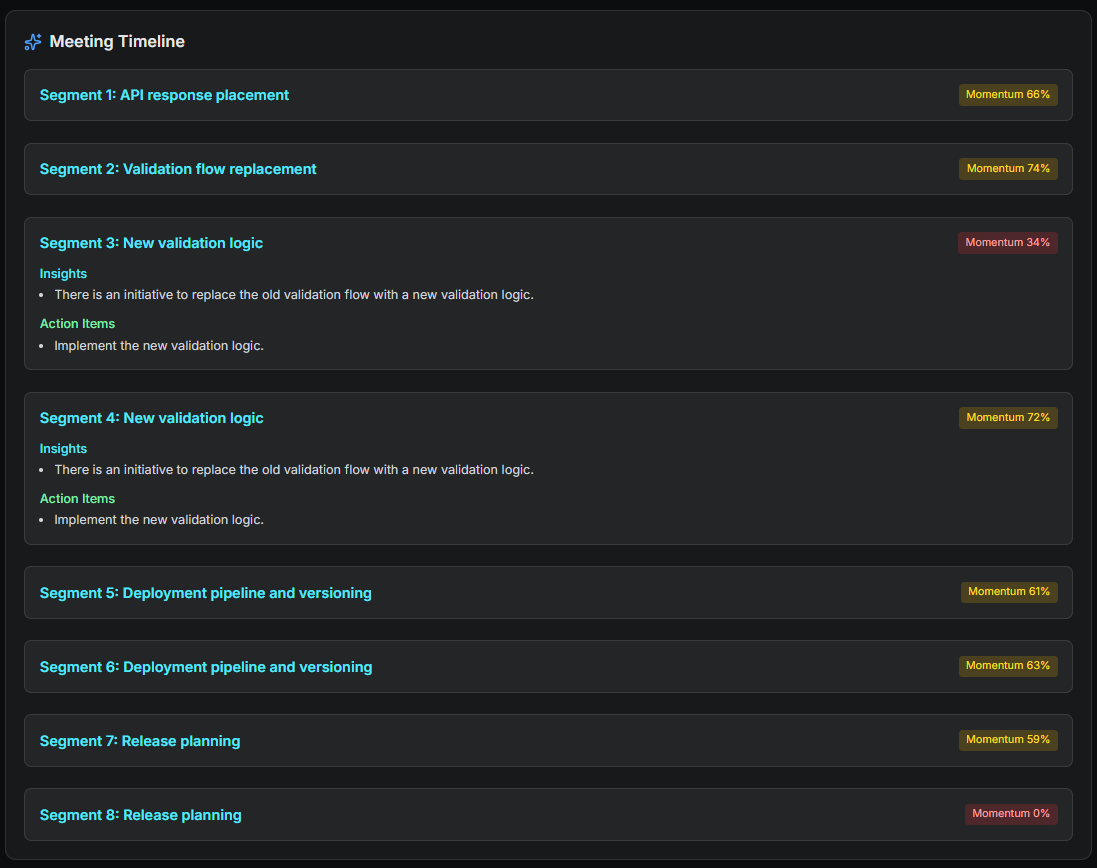
The Meeting Timeline displays your meeting as a sequence of topic-based segments, ordered exactly as they occurred.
Each segment represents a distinct phase of the conversation, showing what the team was focused on and how productive that moment was.
What a Timeline Segment Represents
A segment groups together consecutive conversation turns that belong to the same topic.
- Topic title: a concise label describing what was being discussed
- Momentum score: how aligned or productive that segment was
- Insights: notable outcomes identified within that segment
- Action items: tasks that emerged during that topic
The same topic may appear multiple times if the conversation returns to it later.
How to Read the Timeline
- Repeated topic titles → the team revisited the same issue
- Momentum drops → confusion, blockers, or misalignment
- Momentum spikes → decisions or clear progress
- Segments with action items → moments that produced concrete outcomes
Reading the timeline from top to bottom gives you a reliable reconstruction of how the meeting evolved.
Limitations
Timeline segments are derived from transcript structure and may be affected by:
- Overlapping speech
- Rapid topic switching
- Very short conversational turns
- Ambiguous topic boundaries