
Live Transcript Window
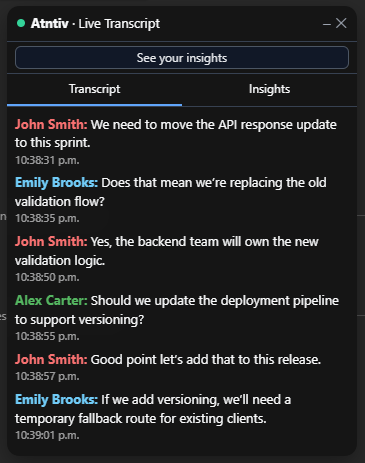
The Live Transcript Window appears automatically during a meeting once live captions are enabled. It shows the conversation as it happens, organized and easy to follow.
When It Appears
The window opens automatically when:
- You are inside a supported meeting
- Live captions are enabled
- Speech starts appearing as text
No manual action is required.
What You’ll See
The Live Transcript Window is designed for clarity and focus during the meeting.
- Live transcript stream grouped by speaker
- Clear visual separation between speech segments
- Timestamps showing when each segment occurred
- A primary action button to open your meeting results
How the Transcript Is Organized
Instead of a long block of text, the transcript is divided into short, readable segments.
- Each segment represents a continuous spoken thought
- Segments reset naturally when speakers change
- This makes long meetings easier to scan and review
After the Meeting
When the meeting ends, you can use the action button in the window to open everything that was captured.
You don’t need to save anything manually.
If the Window Doesn’t Appear
In most cases, this happens when captions are not enabled or the meeting reloads.
Go to Troubleshooting →